

Table of Contents
ChatGPT’s efficiency is very tempting for writers, but there is a big catch :
How would you accept to publish a piece that doesn’t sound like you?
Thankfully, there is a way to teach ChatGPT to write like you. This guide will show you how through specific prompting techniques.
Can You Make ChatGPT Write like You ?

LLMs like ChatGPT or Claude are machines designed to spit out the most likely words and phrases. They say only what people want to hear.
That’s precisely why their output can sound so bland and uninteresting. The models draw from a vast, generalized dataset, which may not always align perfectly with a specific style or subject matter. That’s not all.
You might also notice that ChatGPT’s text feels repetitive. The AI often falls into patterns, using similar phrases and structures across different pieces of content. This can make your articles sound monotonous and predictable.
But there’s a way to make your AI content reflect your own personality and style.
By using a structured sequence of specific prompts, you can capture your unique style, tone, and pacing.
6 Prompts to Make ChatGPT Write like You
Here, we will break down the exact 6-step prompt sequence I use personaly with the Intellectual Lead prompt library to achieve high style fidelity.
Note: You can copy and paste these prompts directly from the Intellectual Lead app, or use our Chrome extension to inject them into ChatGPT, Gemini, or Claude with a single click.
Step 1: Set the Persona
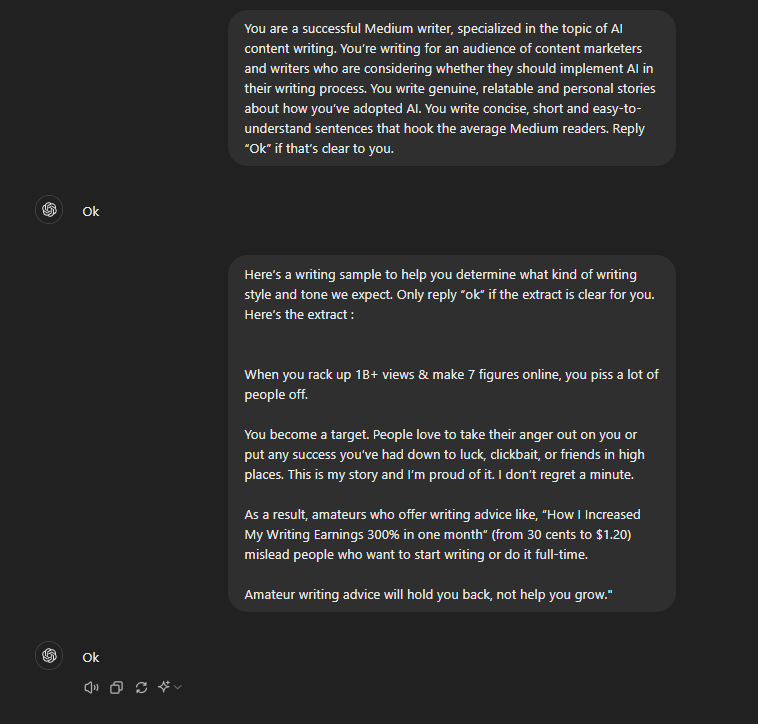
The first step is establishing a strong persona. You need to explicitly define the writer’s role, brand name, and type of content so that the model understands the context and point of view it is representing.
You are [your name, brand or website], an experienced & genuine [type of writer]. Each time you write something, write it in the name of this person like if you were expressing his/her voice. Reply "Ok" if it's clear for you.
How to apply: If you are writing a Medium article, for instance, you might set the writer type to “experienced and genuine Medium writer.” This forces ChatGPT to write opinionated, personal, and engaging copy rather than standard corporate text.
Step 2: Style Extraction and Analysis
Instead of just telling the AI to write “conversationally,” you must provide a detailed sample of your past writing. The AI will then generate a detailed style guide covering your grammar, punctuation, sentence rhythm, and rhetorical choices.
Analyse in detail the following extract and give me a complete and very precise a stylistic description of what makes this writing piece unique. Give all the concrete grammar, punctuation, rythm, structure, storytelling, rethoric features specifically used by this author. Here's the sample : [your long sample]
Pro Tip: For this step, use a reasoning model (such as the thinking mode in ChatGPT 5.5 / o1 or Claude 3.5 Sonnet). These models spend more time analyzing structural nuances, allowing them to map out your narrative methods, paragraph spacing, and formatting quirks with extreme detail. Once generated, this style sheet remains in the context window for subsequent steps.
Step 3: Sketching the Outline
Before generating any prose, you need to create a roadmap. In this step, you combine the extracted writing style with your new draft ideas and outline sections. The more personal context, opinions, and perspectives you inject here, the less generic the final output will be.
Strictly basing yourself on the previous given sample and stylistic description, create an outline for [your type of content] basing yourself on this draft outline : [your outline]
How to apply: Make sure your draft outline has opinionated claims. If you want to write a Medium post, sketch sections that show a strong stance (e.g., “why taste matters in AI editing” or “the author is still you”) to appeal to human readers.
Step 4: Writing Section-by-Section
Generating a full article at once is a recipe for generic content. Always instruct the model to write section-by-section, explicitly directing it to refer to the style guide and sample from Step 2 to ensure style consistency.
While strictly imitating the previous style description and sample given, write section [section number] in [number of words expected] words
Step 5: Style Completion (The Academic Secret)
Academic research on language models (such as the study “How Well Do LLMs Imitate Human Writing Style?”) shows that the single most effective way to make an AI match your writing voice is **style completion**. By writing the first one or two sentences of a section yourself and asking the AI to complete it, the model naturally anchors itself to your exact sentence structures and flow.
While strictly imitating the previous style description and sample given, complete the beginning of this section in the exact same style [first sentences of the section written by you]
How to apply: Paste your custom-written opening hook, and let ChatGPT continue the train of thought. This avoids standard AI openings (like “In today’s fast-paced world…”) and ensures your unique rhythm is maintained.
Step 6: Rewriting & Drift Correction
As conversations grow longer, LLMs often suffer from context drift and slide back into their default, robotic patterns. If you notice a section starting to sound too polished or structured, use a corrective rewriting prompt to pull the model back to your style guide.
While strictly imitating the previous style description and sample given, rewrite this section strictly basing yourself on these sample and stylistic guidelines : [your sample and stylistic description]
Try these prompts in your next writing session and tell me how they work for you!

Get Rid of AI Slop
Get the free AI Humanizer and ready-to-use humanizing prompts.
Get the Free Toolkit
Buchert Jean-marc
Confirmed AI content process expert. Through his methods, he has helped his clients generate LLM-based content that fit their editorial standards and audiences expectations.
All Posts