


Table of Contents
Anyword is one of the only tools that scores your copy before you publish it. Or at least from my knowledge.
But is it really worth it ?
In this review, you’ll get a clear, honest look at what makes Anyword unique and my personal experience.
Anyword Unique Features
Predictive Performance Score (the feature that makes Anyword “different”)
Anyword gives every piece of copy a Predictive Performance Score from 0 to 100. This score is based on how similar messages have performed across millions of ads, emails, landing pages, and social posts.
In practice, here’s what you can do:
- Paste your existing copy (for example, a LinkedIn post or ad).
- Let Anyword score it and show you how likely it is to engage or convert.
- Ask it to rewrite the copy to improve that score.
On top of the score, you also get a Score Panel that shows:
- Which demographics are most likely to respond (age, gender).
- Main emotions in the copy.
- Key offers, pains, benefits, and CTAs Anyword detects.
- Basic channel policy checks (for example, if a Facebook ad might be risky).
Template-based workflows that still feel flexible
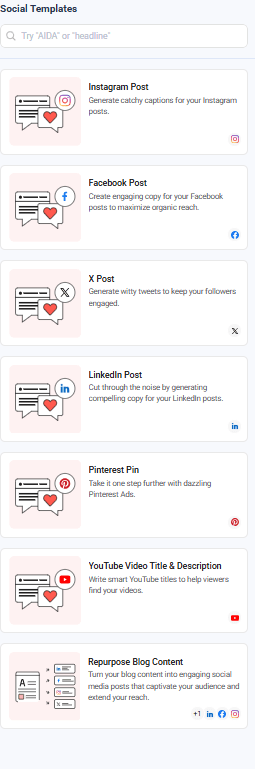
Anyword is very template-driven, which makes it easy to plug into your existing workflows. You get templates for:
- LinkedIn posts and other social content
- Facebook, Google, and other ad formats
- Email subject lines and campaigns
- Landing pages and product pages
- Blog posts and long-form content via the Blog Wizard
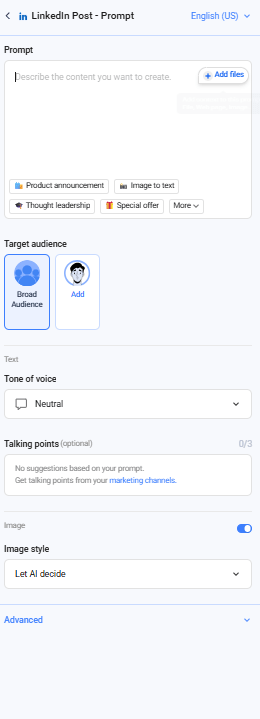
You pick a template, set:
- Your goal (clicks, sign-ups, sales).
- Your target audience.
- The talking points and key ideas you want to highlight.
Anyword then generates several variations and scores them. You can tweak the talking points, adjust the audience, and regenerate until you hit a score you’re happy with.
It’s especially useful when you’re writing the same type of asset over and over (ads, social posts, email intros) and you want fresh angles without starting from a blank page every time.
Brand voice, audience targeting, and “talking points” memory
Anyword also lets you set up:
- Brand voice – so the copy feels closer to your actual tone.
- Audience profiles – so it can tailor language and framing to specific segments.
- Talking points / messaging banks – a kind of internal database of key messages you want the AI to reuse.
It also means you don’t have to remind the tool of your positioning in every single prompt. Once your brand voice and talking points are configured, you spend less time “prompt babysitting” and more time evaluating output.
Analytics, benchmarking, and a real feedback loop
Anyword closes a loop most AI tools leave open. Instead of stopping at “here’s your copy”, it gives you features to:
- Analyze and improve existing content across channels (not just AI-generated text).
- Benchmark copy against industry or channel standards.
- Keep all your assets in one place with performance insights attached.
Anyword Pricing
Free access and trial
If you just want to test the waters, you have two low-friction options:
- A free plan with limited features and a small number of predictive scores. It’s enough to understand the workflow and see how the scoring feels on your real copy.
- A 7-day free trial on paid plans so you can try the full feature set (including predictive scoring, templates, and Blog Wizard) before you commit.
Starter – for solo marketers and freelancers
- Typical price: around $49/month on monthly billing, or about $39/month when billed annually.
- Who it’s for: solo marketers, freelancers, and small creators who want unlimited copy generation plus a taste of data-driven feedback.
- What you get (examples):
- Unlimited copy generation
- Around 100 performance predictions per month
- ~50 performance data rows
- 1 seat, 1 brand voice, 100+ templates, Blog Wizard, Chrome extension
If you mainly write your own copy and occasionally want Anyword to score and improve it, Starter is usually enough.
Data-Driven – for small marketing teams
- Typical price: around $99/month (or about $79/month annually).
- Who it’s for: small teams who want predictive scoring and collaboration.
- What you get on top of Starter:
- More performance predictions (often 175+ per month)
- 3 seats instead of one
- Real-time performance predictions while you manually edit copy
If you’re running ads, emails, and social content regularly, Data-Driven is where Anyword starts to show its full value.
Business & Enterprise – for teams that want data at scale
- Business: usually starts around $499/month, with 250+ monthly predictions and up to 5,000 performance data rows pulled from your connected channels.
- Enterprise: custom pricing, with 500+ predictions, 10,000+ performance data rows, private LLM, SSO, custom models, and full API access.
My Personal Opinion & Experience
The Predictive Performance Score is the reason I kept using Anyword beyond the first try. It’s genuinely different from other writing models because it doesn’t let you settle for “good enough.”
I also like how easy the templates are to use. They’re structured enough to guide you, but not so rigid that you feel trapped.
But I warn you, you’ll only get the best results when you don’t rely on Anyword for creativity.
Instead, try this workflow:
- Draft your copy in your usual tool (or even by hand if that’s your style).
- Paste it into Anyword to see how it scores.
- Ask for improvements that raise the score.
- Use those suggestions to refine your original draft.
Of course, it’s not the perfect tool for everything.
- Long-form content still needs heavy human editing. Anyword can generate longer pieces, but depth, nuance, and storytelling are not its strong suit.
- It sometimes repeats similar structures. Because it’s optimized for performance, it tends to default to proven formulas, which can feel predictable if you rely on it too much.
- High scores aren’t guarantees. A 90/100 doesn’t guarantee a winning ad — it simply means the copy aligns with patterns that have historically performed well.
But honestly, none of these are dealbreakers if you use the tool the right way.
Anyword Best Alternatives
Anyword is strong on performance feedback, but other platforms can be better for creativity, long-form SEO, or team workflows.
Copy.ai – Best for flexible, unlimited content on a budget
Copy.ai is another big name you can’t ignore. It’s template-based like Anyword, but its focus is on speed and volume, especially for teams that need lots of copy across channels.
Where Copy.ai helps you:
- Unlimited words on paid plans
Pro and higher tiers typically offer unlimited content generation, which is attractive when you’re churning out ideas and variations every day. - Good all-round templates
You get templates for blog content, social posts, emails, sales copy, website sections, and more. It’s easy to use, especially if you want to hand it to non-writers on your team. - Usage-based or seat-based pricing
Copy.ai offers a mix of Pro plans (around $49/month in many markets) and usage-based enterprise models with API access and workflow credits.
Where it falls short vs Anyword:
- It doesn’t go as deep on predictive performance scoring or conversion analytics.
- It’s better for “get me lots of options fast” than “tell me which option will likely win.”
Choose Copy.ai over Anyword when:
- Your main pain is volume, not performance modeling.
- You want an affordable way to give AI writing to several people at once.
- You already have strong internal data and don’t need a tool to “tell you” what performs.
Writesonic – Best if you want AI + SEO in one place
If your world is SEO-first, Writesonic can be an interesting alternative. It leans into SEO-focused content, integrating real-time SEO data and SERP insights alongside AI writing.
Why you might like it:
- SEO-aware long-form tools
Blog and article tools that consider keywords, meta data, and structure from the beginning. - Real-time SEO suggestions
Some plans combine AI writing with keyword and SERP intelligence, which saves you jumping between an SEO tool and a writer. - Good mix of short- and long-form
You still get ad and social templates, but the platform feels more at home in blog and landing-page workflows than Anyword does.
Where Anyword still wins:
- Anyword is stronger when you care about conversion-focused copy and predictive scoring for ads and emails.
- Writesonic is better if your priority is organic traffic and SEO workflows rather than paid performance.
General-purpose models (ChatGPT, Gemini, etc.) – Best if you want flexibility over structure
You can also use general AI models like ChatGPT or Gemini as alternatives or complements. They’re not copywriting platforms in the same way, but they do give you:
- Very flexible prompting for strategies, outlines, and drafts.
- The ability to mix research + writing in one place.
- Often better reasoning for complex or technical topics.
What they don’t give you by default:
- Predictive performance scores.
- Built-in templates for ad networks.
- Native integrations with ad managers or email tools.
A lot of marketers end up with a hybrid stack:
- Use ChatGPT/Gemini for research, ideation, and first drafts.
- Use Anyword (or another copy tool) to optimize, score, and iterate on the pieces that directly affect performance.
FAQ
1. Is Anyword free?
Yes, Anyword offers a free plan and also a 7-day free trial of the paid plans.
The free plan is good for getting a feel for:
- The interface
- Basic copy generation
- A limited number of performance scores
You’ll very quickly hit its limits if you write regularly, but it’s enough to understand whether the model’s style and predictive scoring make sense for you.
2. How much does Anyword really cost per month?
As of late 2025, the public pricing looks roughly like this (monthly billing):
- Starter – around $49/month
- Data-Driven – around $99/month
- Business & Enterprise – custom pricing
On annual billing, those Starter and Data-Driven prices drop to around $39 and $79/month respectively.
Starter is usually enough if you’re a solo marketer. Data-Driven is better if you’re a small team and you want more predictions, more collaboration, and real-time scoring.
3. What do I actually get at each pricing tier?
Here’s the simple version based on the latest pricing page:
Starter (solo creators, freelancers):
- Unlimited copy generation
- 1 brand voice
- 1 seat
- 100+ templates and prompts
- Blog Wizard + plagiarism checker
- Chrome extension
- Around 50–100 performance predictions per month
Data-Driven (small teams):
- Everything in Starter
- Around 100–175 performance predictions per month
- 3 seats
- Real-time performance predictions when you manually edit copy
Business & Enterprise (larger teams, agencies, brands):
- Many more predictions and performance data rows
- Custom-built AI models and private LLM in Enterprise
- Integrations with marketing channels
- Workspaces, roles & permissions, SSO, security reviews, API access
If you’re mostly focused on copy performance and you don’t need heavy governance, you’ll live comfortably in Starter or Data-Driven.
4. Does Anyword really improve performance, or is it just another writing tool?
Anyword is built around one promise: closing the feedback loop on your copy.
Instead of just generating text, it:
- Scores your copy with a Predictive Performance Score
- Shows you which parts help or hurt performance
- Suggests higher-scoring alternatives before you publish
That doesn’t guarantee better results (there are too many variables in your funnel), but it gives you a data-informed starting point instead of guesswork.
From a practical point of view, it’s most helpful when:
- You run paid campaigns (Facebook, Google, LinkedIn, etc.)
- You write email subject lines and promo copy regularly
- You experiment with social hooks and want a quick way to compare versions
If you mostly publish long, educational blog posts, the performance gain is less direct.
5. Is Anyword good for long-form SEO content?
It can generate blog posts and supports a Blog Wizard, but long-form SEO is not where Anyword is strongest.
You’ll often find that:
- The structure is fine, but the depth is shallow.
- It leans on generic phrasing and safe patterns.
- You still need to do heavy editing to add originality, narrative, and real expertise.
If your main focus is long-form SEO, you might prefer to:
- Use another tool (or model) to build a detailed, research-backed draft.
- Then paste key sections into Anyword to optimize intros, CTAs, headlines, and ad variants that promote that content.
Anyword shines in conversion moments, not in 3,000-word thought leadership.
6. Is my data safe with Anyword?
According to Anyword’s own collateral, the platform is built with SOC 2, ISO 27001, GDPR, and HIPAA compliance in mind, plus enterprise-grade security features (SSO, private LLM, custom integrations on higher tiers).
For you, that means:
- It’s viable to use with more regulated clients, as long as legal and security teams sign off.
- Enterprise plans are specifically designed for stricter data and privacy requirements.
That said, you should still avoid pasting sensitive raw data unless your organization has formally approved the tool and plan you’re on.
7. Who is Anyword best suited for?
You’ll get the most value from Anyword if you:
- Own ad performance, email performance, or social engagement.
- Need to test multiple variations fast and want guidance on which ones are likely to win.
- Work with teams or clients who ask, “Why this version?” — and you want data to answer.
If you live in spreadsheets, dashboards, and A/B tests, Anyword fits naturally into your work.
8. What are the best alternatives to Anyword?
The main alternatives you’ll see mentioned are tools like Jasper, Writesonic, Copy.ai, and more general AI platforms. Most of them:
- Focus on volume and variety of content (especially long-form and SEO).
- Don’t go as deep on predictive scoring and performance analytics.
In other words:
- Choose Anyword if your priority is conversion and performance feedback.
- Choose another writer (or a general AI model) if your priority is long-form, brand storytelling, or cost per word.
You don’t have to pick only one. A lot of marketers use:
- One tool for research and drafting.
- Anyword as the performance layer to score and refine key assets before they go live.

Free Prompts and Ebook to Humanize Your Text
Download Now
Buchert Jean-marc
Confirmed AI content process expert. Through his methods, he has helped his clients generate LLM-based content that fit their editorial standards and audiences expectations.
All Posts

