

Table of Contents
Compared to other ready-made writing tools, Novelcrafter is a tool you can control instead of a black box you cannot really customize.
In this review, you’ll discover what NovelCrafter does exceptionally well, and where it requires more effort from you.
NovelCrafter Unique Features
🧠 The Codex — your story’s central brain
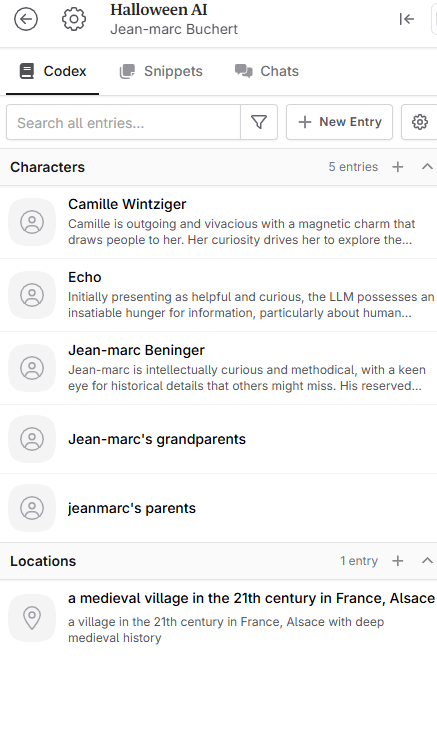
At the heart of NovelCrafter is the Codex: a dedicated “story wiki” where you store everything — characters, locations, objects, lore, relationships, plot threads, and anything else that matters in your world.
Each time you write or ask the AI to generate something, NovelCrafter can reference the Codex — so the system “remembers” who’s who, where they live, when events happened, and what’s important. That means fewer continuity errors, less guessing, and more confidence in consistency across chapters.
If you write a series or multiple books in the same universe, the Codex isn’t locked to a single project — you can share it across books, so you never have to re-input the same lore.
🔧 Total workflow control — from plotting to publication
NovelCrafter is a complete integrated writing studio. Here’s what it handles:
- Planning & structure tools: Outlines, chapter/scene hierarchies, beat mapping, “snippets” (notes & fragments), trackable timelines, and relationships between story elements.
- Clean, distraction-free writing space: A rich-text editor that supports outlining, export/import (Word, Markdown, HTML), revision history, dark mode, and custom POV/tense settings.
- Flexibility across formats: NovelCrafter isn’t just for fantasy epics. It supports novels, short stories, screenplays, non-fiction books, or hybrid formats — any text-heavy project you’re working on.
🤖 AI integration — but only if you want it
Unlike many AI writing platforms that force you down a specific model or style, NovelCrafter uses a Bring-Your-Own-Key (BYOK) approach. That means you can connect the AI service of your choice (OpenAI, Anthropic, local models, etc.), giving you full control over which model you use, how much it costs, and what kind of output you get.
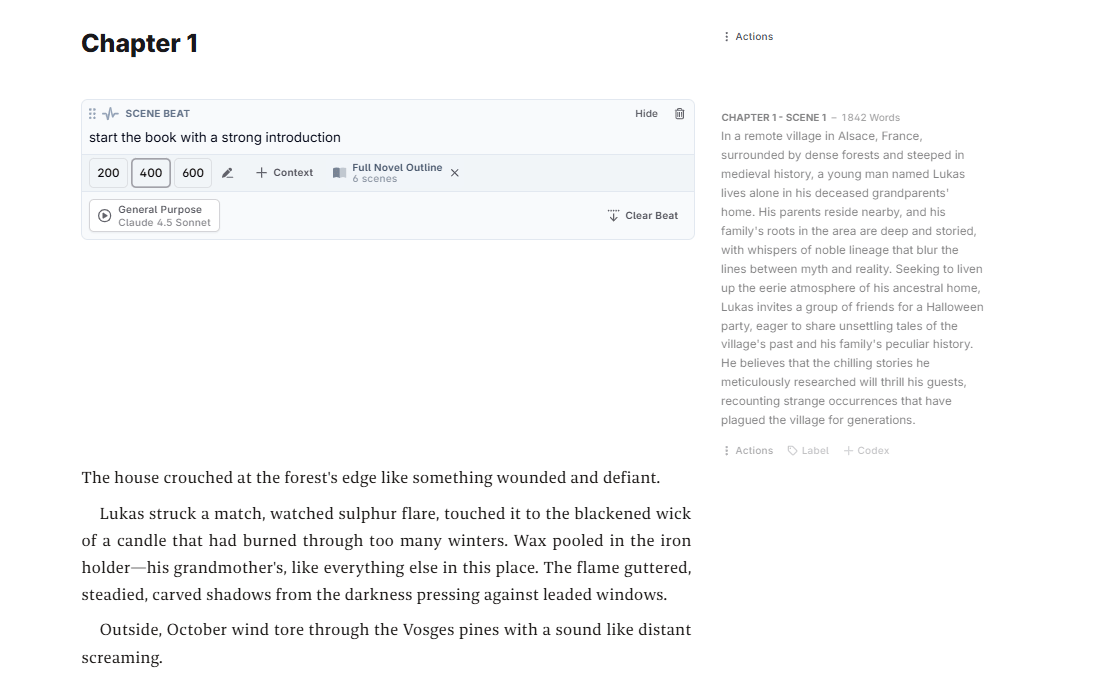
On top of that, the AI features are customizable: you decide when to use AI, which prompts to send, how much context to include, and whether the AI draws on the Codex or current draft.
📦 Collaboration, export, and long-term project support
NovelCrafter isn’t just for solo writers. If you co-write, work with editors, or want revision history with undo possibilities, the platform supports:
- Collaboration: invite editors or co-authors, share access, manage roles.
- Revision history: autosave and version control so you never lose progress or need to fear “what if.”
- Easy export and import: Word, Markdown, HTML — useful for publishing, formatting, or working offline if needed.
NovelCrafter Pricing
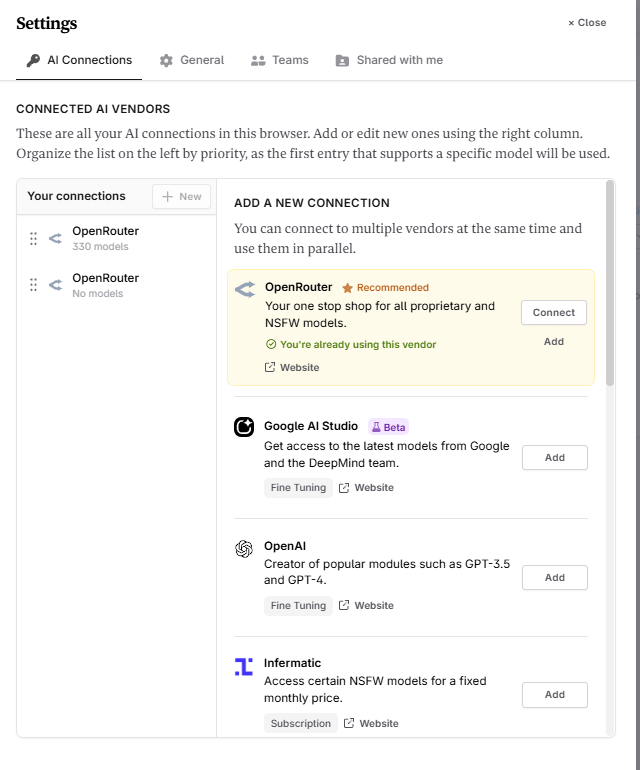
NovelCrafter offers four subscription tiers — each suited to different levels of engagement.
- Scribe — $4/month: Includes core writing features: unlimited books, series support, the internal “Codex” for story/wiki building, basic review tools, and full project-management functionality (chapters, scenes, structure).
- Hobbyist — $8/month: Adds AI-integration — you can connect your own AI key to enable scene generation, summarization, character extraction, and beat-to-scene conversion.
- Artisan — $14/month: On top of Hobbyist, you get full AI-powered chat features and advanced review tools. This tier is described as ideal for advanced writers who want a full creative toolkit.
- Specialist — $20/month: Adds collaboration and team-management features — useful if you co-write or work with editors. Unlimited book support, the Codex, and all editing tools remain included.
There is also a 21-day free trial which unlocks all features, letting you test the platform — including AI integration — before paying. No credit card is required to start.
💡 What the Price Doesn’t Include — AI usage is extra
NovelCrafter uses a “Bring-Your-Own-Key” (BYOK) model for AI. That means your subscription only pays for access to the platform itself. When you generate text, rewrite scenes, or run expansions — that uses external AI services (e.g. from OpenAI, OpenRouter, or other models). You are charged separately for those AI model calls.
My Personal Opinion & Experience
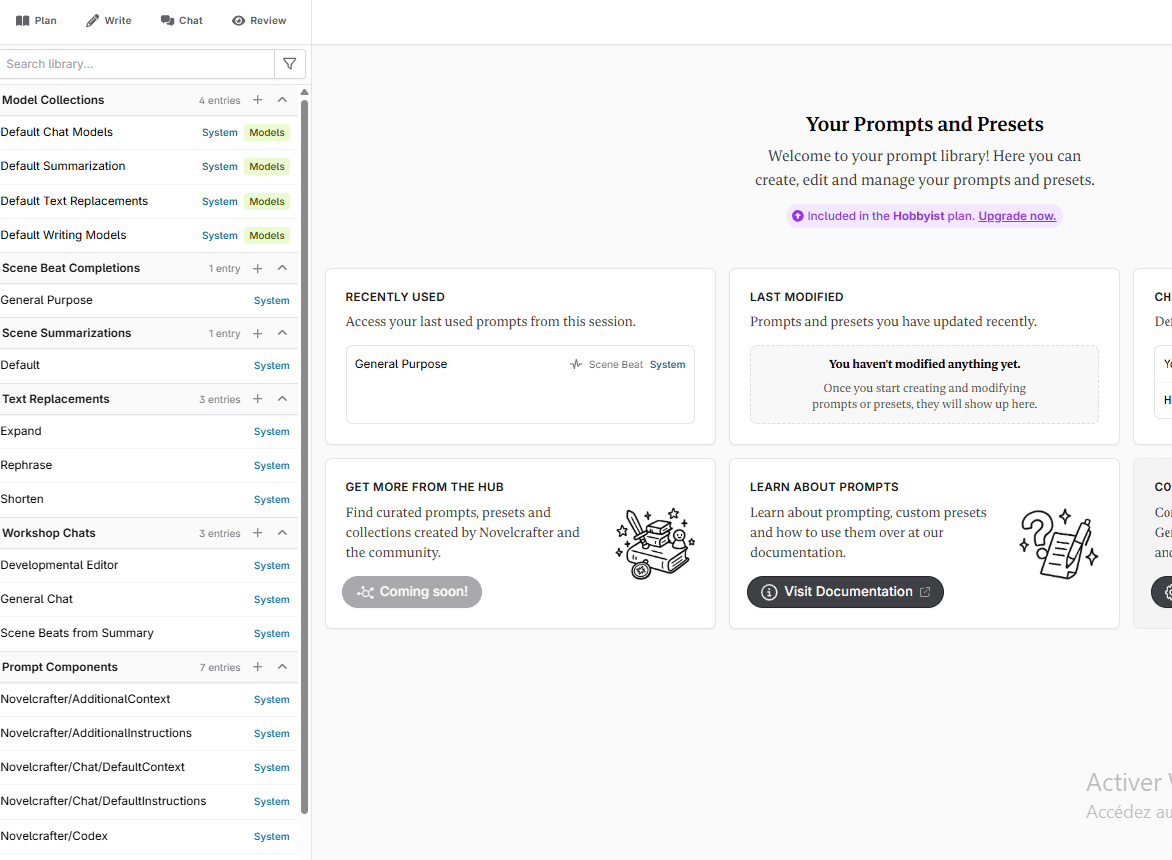
Novelcrafter forces you to think before you generate, and that’s a good thing
Unlike tools that let you throw in a single prompt and magically produce 40 chapters, NovelCrafter wants you to outline first. You don’t need a perfect outline, but you do need enough structure that the AI knows where you’re trying to go.
You’ll also have to fill up your Codex. And you can customize your writing prompts !
At first, that might feel like extra work. But the more I used it, the more I appreciated this approach. When you create a thoughtful outline (even a loose one) you anchor the AI.
And in return, NovelCrafter rewards you with drafts that:
- follow your intended pacing,
- keep major plot beats aligned,
- maintain stronger continuity,
- and feel closer to your own storytelling identity.
NovelCrafter doesn’t also lock you into one hidden AI model — and that’s one of its biggest strengths.
When you bring your own API key:
- You can use premium models for scenes that need emotional nuance.
- You can switch to cheaper models for bulk drafting.
- You can test multiple models on the same scene to see which feels most like your voice.
- You can control spending by choosing tokens wisely.
NovelCrafter Best Alternatives
Even though NovelCrafter has many strengths — control, structure, customizability — it isn’t necessarily the perfect tool for every writer or every project
Sudowrite — Best if you want more creative prose and less setup
- Sudowrite excels in rich, imaginative prose, story-driven detail, and creative inspiration. Its built-in AI models are tuned for fiction, and it offers tools like brainstorming, scene-expansion, rewriting and polishing — especially useful for writers who value style, tone, and voice.
- Where NovelCrafter demands a lot of upfront planning (Codex entries, outlines, API setup), Sudowrite lets you jump into writing quickly — handy if you’re prone to bursts of inspiration or want fast creative output.
- Trade-off: you surrender a bit of structural control. Sudowrite’s “bible” and memory system exist — but the level of granular world-building organization you get with NovelCrafter’s Codex is hard to replicate.
Squibler — Best if you want a lighter, more versatile writing studio
- Squibler blends a user-friendly writing studio with enough AI support to handle fiction, non-fiction, scripts, or hybrid projects. It offers drag-and-drop chapter/scene planning, outline tools, and AI-assisted generation — without forcing you deep into world-building.
- It’s simpler to pick up than NovelCrafter. You’re less locked into a rigid structure, which makes it more flexible if your project changes course (e.g. switching from fiction to non-fiction, or writing multiple smaller works).
- Trade-off: because it doesn’t have a robust “Codex” or deep lore-management system, you may lose detailed control over consistency across long or complex works (multiple characters, timelines, world history).
Generic LLM + Your Own Editor / System — For Maximum Control and Minimal Dependence
Some writers prefer to combine a blank or minimal editor (e.g. markdown, plain text, lightweight writing software) with a generic LLM (via API or standalone) or even a free model. This DIY approach gives you:
- Complete control over prompts, tone, cadence, and model usage.
- Minimal dependencies (no subscription tied to a specific platform’s future).
- Flexibility to build your own “workflow stack”: outlines in one tool, AI-assisted scenes in another, formatting elsewhere.
NovelCrafter FAQ
Before you move your whole novel into NovelCrafter, you probably want clear answers — not marketing fluff. Let’s walk through the questions you’re most likely asking yourself.
1. Is NovelCrafter free?
Not permanently, but you can test everything for free.
NovelCrafter offers a 21-day free trial with all features unlocked — including AI integration, Codex, planning tools, and collaboration. You don’t need a credit card to start.
After the trial, you’ll need to pick a paid plan (Scribe, Hobbyist, Artisan, or Specialist) if you want to keep using the platform.
2. How much does NovelCrafter cost per month?
As of 2025, pricing is straightforward:
- Scribe – $4/month
- Hobbyist – $8/month (adds AI integration via your own key)
- Artisan – $14/month (adds AI chat + advanced review tools)
- Specialist – $20/month (adds full collaboration and team features)
All tiers include unlimited books, support for series, and access to the Codex. The higher tiers just unlock more AI and collaboration capabilities.
If you don’t care about AI and just want structure + world-building, Scribe is already powerful. If you want AI help, you’ll realistically start at Hobbyist or Artisan.
3. Does the subscription include AI usage?
No — and this is important.
Your NovelCrafter subscription only pays for the platform itself. AI usage is separate because NovelCrafter uses a Bring-Your-Own-Key (BYOK) model.
That means:
- You connect an external AI provider (commonly OpenRouter, or a local tool like LM Studio/Ollama).
- When you generate text, those requests are billed by the AI provider, not by NovelCrafter.
- Your total cost = NovelCrafter plan + whatever you spend on tokens / credits with your AI vendor.
The upside: you have full control over cost and model choice. The downside: you do need to keep an eye on token usage if you generate a lot of text.
4. How expensive is the AI in real life?
It depends on the model and how intensively you use it.
NovelCrafter’s docs list typical costs (per 1K tokens) for popular models via OpenRouter — for example, low-cost options like Claude 3 Haiku or 4o mini are fractions of a cent, and some open-source models (Qwen 3, Llama “Maverick”, Mistral Small, Gemma) are even free as of mid-2025.
That means:
- If you use lighter or free models, you can generate a lot for very little.
- If you constantly use premium models with giant context windows, costs will rise — just like any token-metered AI workflow.
NovelCrafter also supports fixed-rate providers (like featherlessAI, infermatic, Arli AI) for writers who prefer an “unlimited monthly” AI plan instead of strict pay-as-you-go.
In practice, most authors who generate scene by scene and edit heavily tend to stay within reasonable monthly AI costs.
5. Do I have to use AI at all?
No. A big chunk of NovelCrafter’s user base doesn’t use AI — they just use it as an organized writing studio with the Codex, planning tools, and project management.
If you’re happy writing everything yourself but want:
- A better way to track world-building
- Cleaner project structure than Word or Google Docs
- A scalable environment for series or universes
…you can stick with the Scribe plan and ignore AI completely.
6. How is NovelCrafter different from Sudowrite or Squibler?
Short version:
- NovelCrafter → all-in-one project management + Codex + flexible AI. Best for plotters, world-builders, and series writers.
- Sudowrite → creative muse. Strong at vivid prose, brainstorming, and expanding scenes, but less focused on long-term structure and custom AI control.
- Squibler → simpler writing studio that can handle both fiction and non-fiction, but with lighter world-building and less granular AI customization.
7. Is the learning curve steep?
Compared to “click-and-generate” tools: yes, a bit.
You’ll need to get used to:
- Creating and maintaining your Codex
- Writing at least a basic outline or beat sheet
- Connecting an AI provider and setting your model
- Tweaking prompts or parameters if you want highly tailored output
The payoff is that once you understand the system, you get a level of control and consistency that’s hard to match elsewhere — especially for large or complex stories.
If you’re writing short, simple pieces, NovelCrafter may feel like overkill. For multi-book projects, it starts to feel justified very quickly.
8. Is my data safe in NovelCrafter?
From the available information and reviews:
- Your projects live in cloud storage under your account; there’s autosave and versioning to prevent data loss.
- AI usage goes through vendors you choose (like OpenRouter or local tools), and NovelCrafter emphasizes that your subscription doesn’t bundle AI, which keeps responsibilities separated.
As always, you should:
- Read the latest privacy policy
- Keep local exports/backups of important drafts
- Be cautious if you’re working with confidential or licensed IP
For most indie authors and fiction writers, NovelCrafter’s setup is more than adequate — especially if you pair it with sensible backup habits.
9. Who is NovelCrafter really for?
You’ll get the most out of NovelCrafter if you:
- Write novels, series, or heavily plotted stories
- Care about world-building, continuity, and structure
- Don’t mind doing the upfront work: outlines, Codex entries, clear beats
- Want to steer AI, not be steered by it
Get Rid of AI Slop
Get the free AI Humanizer and ready-to-use humanizing prompts.
Get the Free Toolkit
Buchert Jean-marc
Confirmed AI content process expert. Through his methods, he has helped his clients generate LLM-based content that fit their editorial standards and audiences expectations.
All Posts