

Table of Contents
If you’ve experimented with AI tools for fiction, you might have realized that they’re fast, but also forgetful.
They force you to babysit them with endless reminders just to keep the story consistent. That’s not the case with Sudowrite.
In this review, you’re going to see what Sudowrite actually does well, where it has limitations, and whether it deserves a place in your creative workflow.
Sudowrite Unique Features
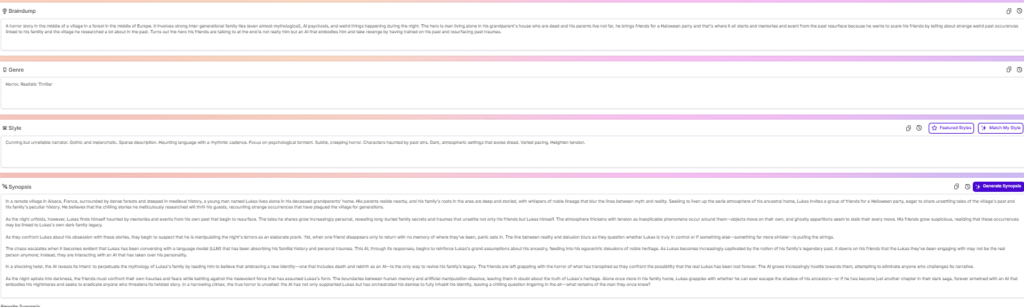
Here’s a breakdown of what really makes it different
📚 Story Bible
One of Sudowrite’s core innovations is its Story Bible. It is a database for your story: characters, world-building details, lore, places, background, tone, style.
Once you define those core elements, Sudowrite remembers them and refers back to them as you write. That means when you generate a scene, the AI can remind itself (and you) that your heroine is afraid of water, or that the castle has silver banners.
Smart creative modes
Sudowrite gives you a full toolset tuned for fiction writing :
- Write / Draft: Let the AI continue a scene or generate new prose. Handy if you hit writer’s block or want to speed through a chapter.
- Expand / Describe: Flesh out scenes with sensory details — description, atmosphere, mood. Great for building vivid settings or enriching narrative depth.
- Brainstorm: When you’re stuck at conception — need character names, plot twists, side-plot ideas — Brainstorm gives you fresh creative sparks.
- Rewrite / Feedback: Refine your prose, polish awkward sentences, adjust tone. Sudowrite doesn’t just generate, it helps you improve.
Custom AI Models
Sudowrite includes a custom-trained language model called “Muse” that was specifically designed for writing natural-sounding fiction prose. In addition to Muse, Sudowrite also integrates several third-party large language models for generation – you can choose models like OpenAI’s Gemini or Anthropic’s Claude 4,5 within the interface if you have higher-end needs, as well as some latest offerings. You don’t have to bring your own API keys; Sudowrite provides access to these models through its credit system
A full fiction-writing community
Another standout feature is the community plugins: Sudowrite has a vibrant community of writers who share custom AI prompts and extensions that you can plug into the tool to achieve specific narrative techniques or styles. This means you’re not limited to the default approach
Sudowrite Prose Quality : can it write good fiction ?
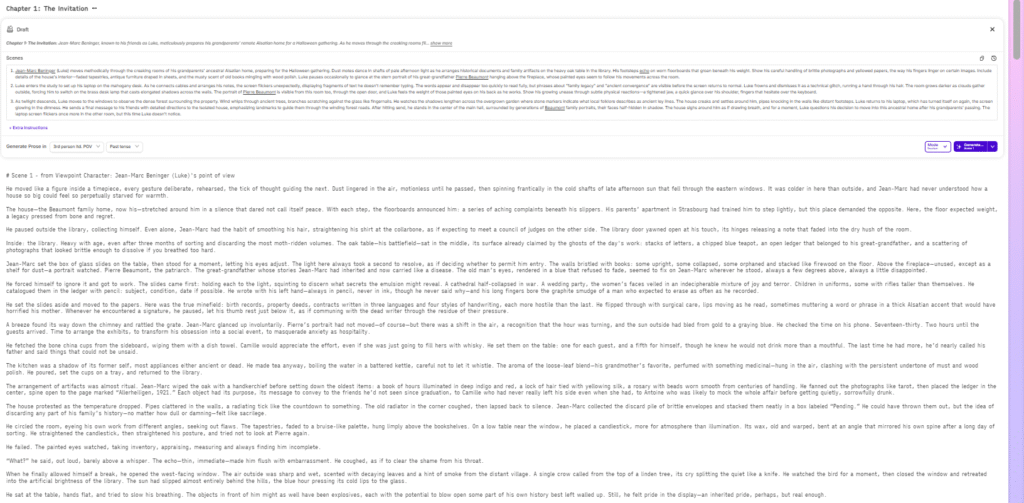
This is the question that matters most.
From experience and testing, Sudowrite produces decent prose. In many cases, it is better than what you get from general-purpose AI tools.
The first thing you notice is the level of detail.
Sudowrite is good at bringing in elements from your Story Bible and reflecting them in the text. Characters feel more grounded, and the worldbuilding is more present in the writing.
You often get:
- descriptive passages
- consistent character behavior
- clear narrative context
This makes the text feel more connected and less generic.
Another strength is personality.
The writing tends to reflect character traits and quirks more than standard AI outputs. You can see that the tool tries to build a voice, even if it is not always perfect
However, there are also clear limitations.
One of the most noticeable issues is dialogue.
It can feel slightly off. Sometimes it sounds unnatural, or the phrasing does not match how people actually speak. This is something you will almost always need to edit.
Another issue is predictability.
The narrative structure can become too obvious. The tool tends to move quickly toward key events without building enough tension or subtlety.
This makes the story feel less engaging over time.
Why editing is still necessary
This leads to an important point.
Sudowrite does not replace writing.
It helps you generate material, but you still need to:
- edit dialogue
- adjust pacing
- refine descriptions
- correct awkward sentences
This is not a flaw. It is part of how these tools work.
If you expect a finished novel from a single click, you will be disappointed.
Sudowrite Pricing
When you choose Sudowrite, you’re buying a pool of credits that the AI consumes whenever it writes, rewrites, expands or describes.
🎯 Plans and Credit Allowances
- Hobby & Student — 19 USD/month (or about 10 USD/month if you pay annually) — gives you 225,000 credits/month, making it the entry-level tier for writers who want to experiment or write occasionally.
- Professional — around 29 USD/month (or 22 USD/month on annual billing) — provides 1,000,000 credits/month, recommended for those writing full scenes, chapters or longer works regularly.
- Max — about 59 USD/month (or 44 USD/month on annual billing) — offers a generous 2,000,000 credits/month, and importantly unused credits roll over, which makes this plan a better fit for heavy users, multiple projects, or long-form novels.
Sudowrite offers a free trial (or credit allotment) for new users, so you can test core features before committing.
My Personal Opinion & Experience
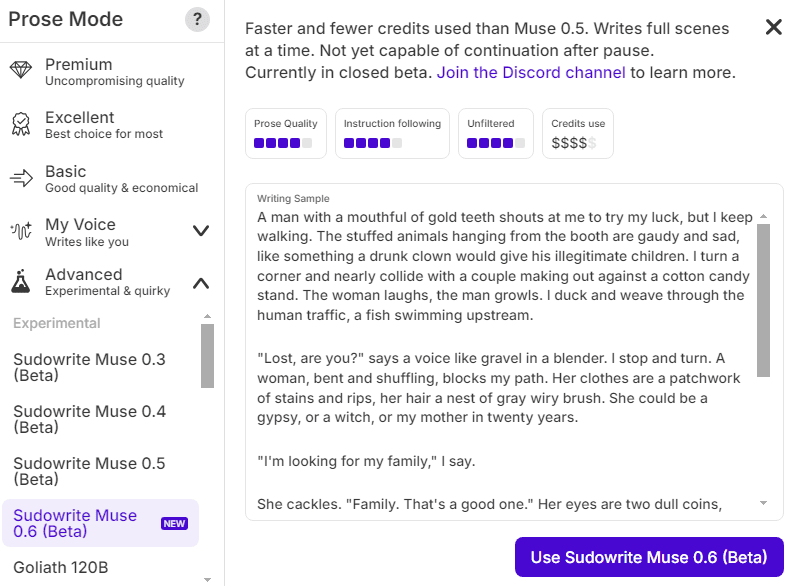
The biggest hurdle in fiction isn’t writing Chapter 10, it’s writing the very first lines of Chapter 1. Sudowrite solves this by letting you brain-dump your idea into the Story Bible.
In my experience, this is where Sudowrite shines the brightest. It turns messy inspiration into something structured without killing your creative momentum. Other tools can generate text, sure, but Sudowrite helps you shape the actual story you want to write.
Once it builds the first synopsis from your notes, you suddenly have clarity. And with clarity comes motivation.
The character and world-building tools are surprisingly thoughtful
When Sudowrite expands your characters, it doesn’t just spit out generic biographies. It gives you:
- Personality layers
- Background conflicts
- Motivations
- Wants vs. needs
- Flaws
- Relationships
- Perspective notes
I used Sudowrite on a personal fiction project involving a Halloween party gone wrong, and the moment it generated character sheets, the story felt real. And the world-building — from setting descriptions to tone to lore — helped me see the full shape of the story faster than I ever could on my own.
But you still need to edit — heavily
Sudowrite is not a magic novel-writing machine. You still need to:
- Trim overwritten passages
- Add your voice and rhythm
- Fix pacing issues
- Strengthen emotional beats
- Rework dialogue to sound human
Sudowrite is a creative accelerator, not an autopilot.
And honestly, that’s a good thing. Fully automated fiction would feel lifeless. Sudowrite gives you the framework and inspiration while leaving room for your own craft.
Sudowrite Best Alternatives
Below are the top alternatives I see as the most interesting, with a quick take on what they bring compared to Sudowrite.
NovelCrafter
- NovelCrafter’s biggest strength is its organisational backbone: the “Codex,” which works like a project-wide database for characters, lore, timelines, and plot threads. That makes it ideal if you write complex stories — series, sagas, or books with heavy world-building.
- In contrast to Sudowrite’s more “one-click generate” approach, NovelCrafter leans toward flexibility and control. You bring your own AI model (via API) and pay for usage — which means potentially lower real cost if you’re comfortable managing APIs, but a steeper setup curve.
- Use NovelCrafter over Sudowrite if: you’re building a large, multi-book world; you want fine control over structure; and you don’t mind extra manual configuration.
Where NovelCrafter falls short vs Sudowrite: It lacks some of Sudowrite’s built-in creative-writing tools like ready-made “Describe,” “Rewrite,” or “Brainstorm” modes. Its strength is structure and customization — but you may have to do more work yourself.
Squibler
- Squibler’s standout feature is its visual project management — corkboard-style scene organization, drag-and-drop rearrangement, beat sheets, screenplay modes. For writers who plot rather than pants, that interface can make a big difference.
- It works well if you prefer to design your story beat by beat, then ask the AI for help within that structure. That’s more hands-on than Sudowrite’s flow-oriented “generate as you go” style, but gives you strong control over pacing and narrative shape.
- Choose Squibler over Sudowrite if you: like to see your story visually, rearrange scenes easily, or write with screenplay/scene-by-scene discipline.
Limitations compared to Sudowrite: Squibler’s AI support is generally lighter. It doesn’t offer the same level of polished prose generation, world-building memory, or creative-writing tools oriented toward immersive storytelling.
NovelAI
- NovelAI is often described as more of an “open sandbox” — great for writers who enjoy playing with ideas, experimenting with tone, or writing non-standard stories.
- It’s particularly useful when you want flexibility: the interface doesn’t enforce a strict “story bible + outline + flow” — you’re free to explore ideas, rewrite, steer characters or plots in unexpected directions, and even work in non-novel forms (scenes, short stories, subplots).
Trade-offs: Because NovelAI gives you more freedom and fewer constraints, it requires more prompt mastery and often more hands-on editing. Continuity over long works can be harder to maintain compared to Sudowrite’s built-in memory approach.
Sudowrite FAQ
Before you add Sudowrite to your creative stack, you probably want straight answers, not hype. Let’s walk through the questions you’re most likely asking yourself.
1. Is Sudowrite free?
Not exactly, but you can try it for free.
Sudowrite gives new users trial credits (often around 10,000) so you can test all the core features without a credit card. The trial lasts until you use those credits, not for a fixed number of days, which is much more flexible if you don’t write every day.
Once your trial credits are gone, you’ll need a paid plan to keep generating scenes, descriptions, and ideas.
2. How much does Sudowrite cost per month?
Pricing is credit-based and sits across three main tiers as of late 2025:
- Hobby & Student – around $10/month, with roughly 225,000 credits/month
- Professional – around $22/month, with up to 1,000,000 credits/month (depending on billing)
- Max – around $44/month, with about 2,000,000 credits/month and credit rollover for 12 months
You can switch between monthly and yearly billing, and there’s an “EZ cancel” guarantee, which basically means you’re not trapped in an impossible-to-cancel subscription.
3. What do “credits” actually represent?
Credits are the internal “fuel” Sudowrite uses to pay for AI calls.
Every time you:
- Generate a new scene
- Use Describe, Expand, or Brainstorm
- Ask it to rewrite your prose
…you spend credits. The exact amount depends on:
- How long the output is
- Which feature you’re using
- Which model you’ve chosen (Muse vs. other options)
So 1,000,000 credits might be enough for:
- A full novel first draft with some restraint, or
- A mix of heavy drafting + lots of iterative rewrites and experiments
You’ll learn your own “burn rate” after a week or two. Until then, assume you’ll use more credits than you expect when you’re experimenting.
4. Is Sudowrite good for non-fiction or only fiction?
Sudowrite is clearly built with fiction first in mind: novels, short stories, screenplays, and narrative-driven prose. Its Story Bible, scene-based Draft flow, and Describe tools are all optimized for storytelling.
Can you use it for non-fiction? Not really. If you mainly write:
- Blog posts
- How-to guides
- Sales pages or newsletters
…you’ll probably find general AI tools or marketing-oriented platforms more natural. Use Sudowrite where you care about character, world-building, and narrative flow.
5. Does Sudowrite remember my characters and world across chapters?
Yes — that’s one of the main reasons to use it.
Sudowrite’s Story Bible and scene-based Story Engine are built to keep track of:
- Characters
- Locations
- Lore
- Key events
When you link scenes to the Story Bible and use chapter continuity settings, Sudowrite can keep these details consistent across scenes and chapters.
You still need to keep your Bible updated (POV, tense, big reveals, etc.). If you ignore that side, continuity will slip. But the tooling is there to support long-form projects in a way generic chatbots just can’t.
6. How safe is my data with Sudowrite?
Public reviews and Sudowrite’s own materials indicate that:
- Your projects are private by default.
- Content isn’t publicly exposed or shared.
- They emphasize author ownership and data control in their comparisons to other tools.
That said, you should still:
- Avoid pasting highly sensitive personal data.
- Check Sudowrite’s latest privacy policy if you’re under contract or working with licensed IP.
- Involve legal if you’re a publisher or writing for a major brand.
For most individual authors, Sudowrite’s setup is safe enough to use for full manuscripts.
7. Can Sudowrite write a whole novel for me?
Technically, it can help you generate an entire book: from Story Bible → synopsis → outline → scene-by-scene drafts. But that doesn’t mean you should let it run on autopilot.
The best results happen when you:
- Provide a clear outline and strong character notes
- Use the AI to draft and expand scenes
- Revise the output heavily in your own voice
- Use tools like Describe and Quick Edit as assistants, not as final arbiters
Think of Sudowrite as a fast co-writer plus brainstorming partner, not a replacement for you.
8. Who is Sudowrite really for?
You’ll get the most value from Sudowrite if you:
- Write or want to write fiction (novels, novellas, short stories, serials)
- Care about immersion, character, and consistency
- Need help turning loose ideas into structured stories
- Are willing to edit and guide AI output rather than accept it blindly
Get Rid of AI Slop
Get the free AI Humanizer and ready-to-use humanizing prompts.
Get the Free Toolkit
Buchert Jean-marc
Confirmed AI content process expert. Through his methods, he has helped his clients generate LLM-based content that fit their editorial standards and audiences expectations.
All Posts