

Table of Contents
When you need to find papers and write about them, there are now plenty AI tools to make your work better.
But which one is the most reliable and effective ?
Below I’ve ranked the top AI platforms that help academic and research professionals based on personal experience & user reviews.
| # | Tool Name | Best For | Pros & Cons (Hands-on) | Pricing |
|---|---|---|---|---|
| 1 |
SciSpace
Visit Site → | All-in-One Workflow (Find, Read, Write) |
Pros • Produced the most comprehensive, structured report. • Intelligent tables summarize findings well. • Understood exact research scope immediately. Cons • Struggled to find 2025 papers (stops at 2024). • Credit system can be slightly confusing. | Freemium Credits/mo |
| 2 |
Elicit
Visit Site → | Screening & Synthesis (Precise Paper Analysis) |
Pros • “Ready-to-go” academic formatting. • Transparent screening (explains selection). • Great for extracting quantitative data. Cons • Found fewer sources than SciSpace. • Database availability lags on cutting-edge papers. | Freemium ~$12/mo |
| 3 |
Gemini Advanced
(Deep Research) Visit Site → | Deep Discovery (Broadest Scope) |
Pros • Strongest single report in testing. • Found 200+ sources including very recent tools. • Excellent synthesis of conflicting data. Cons • Expensive (requires high-tier plans). • Cannot read licensed/paywalled PDFs directly. | Subscription €20–€200/mo |
| 4 |
Jenni AI
Visit Site → | Academic Writing (Drafting Assistant) |
Pros • Acts like a “knowledgeable peer editor”. • Excellent autocomplete & citation integration. • Reduces mechanical work of formatting. Cons • Not a discovery tool (won’t find papers for you). • Requires you to provide the context. | Freemium ~$29/mo |
| 5 |
Scite
Visit Site → | Citation Analysis (Trust & Rigor) |
Pros • Highest Trust: Uses only licensed papers. • “Smart Citations” classify references (support/contrast). • Fully transparent keyword search strategy. Cons • AI summaries were brief and shallow. • Lacks the narrative generation of AI-first tools. | Paid Only ~$16/mo |
| 6 |
Consensus
Visit Site → | Quick Answers (Evidence Verification) |
Pros • Great “at a glance” view of scientific consensus. • Direct claim linking reduces hallucinations. • Precision tool for specific questions. Cons • Outputs are summaries, not full narrative reports. • Less effective for broad exploration. | Freemium ~$15/mo |
1) SciSpace
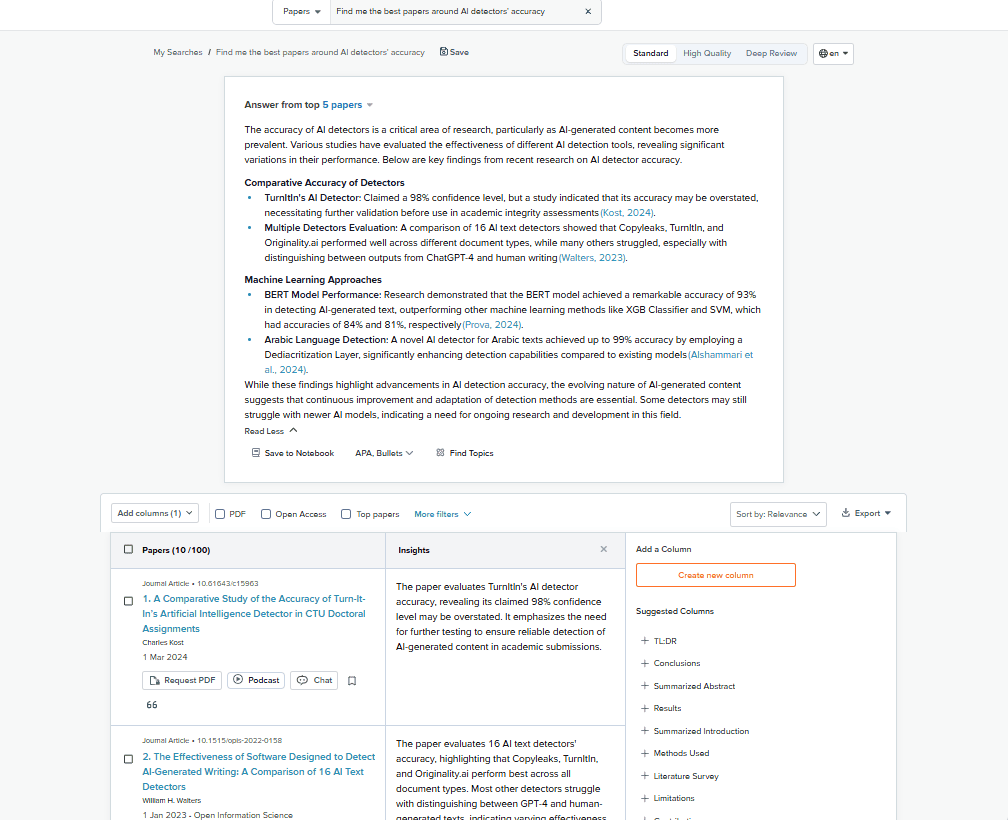
SciSpace is an all-in-one AI research platform designed to help you find papers, understand them, and turn them into structured research outputs. Unlike many tools that specialize in only one step of the process, SciSpace tries to cover the entire workflow.
You work with a single main agent that can research papers, reason across them, draft reports, and generate formatted documents.
Features
- AI research agent that searches and analyzes academic papers
- automatic generation of research reports and literature reviews
- citation generation in multiple formats
- PDF and Zotero imports so you can add your own sources
- tables, summaries, and structured outputs instead of plain text
- a writing interface that lets you turn research into a formal document
Quality of the report (hands-on experience)
With SciSpace, the report was one of the most comprehensive outputs I got. The agent actively tried to cover the subject from multiple angles, pulling in different perspectives and research approaches.
Also, SciSpace found more relevant papers than any other tool I tested. The report was dense, structured, and packed with references. Tables were used intelligently to summarize findings, which made scanning and validation much easier.
Another important detail: SciSpace understood the exact scope of the topic without extra clarification. It focused on AI detection for text, not images or unrelated modalities (my subject of research for this test). That sounds minor, but several other tools failed at this and pulled in irrelevant sources.
There are limitations. Like all tools I tested, SciSpace struggled to surface truly latest-release 2025 papers. Most references stopped around 2024. This seems to be a general indexing and availability issue rather than a SciSpace-specific flaw, but it’s still something you need to account for if your work depends on cutting-edge publications.
Pricing
SciSpace uses a credit-based pricing model.
The first paid plan is relatively affordable and gives you:
- around 1,200 credits
- unlimited access to most core features
- the ability to generate multiple reports and reviews
Compared to other tools in the same price range, SciSpace delivers more value because the credits are mainly tied to intensive research actions, while many writing and exploration features remain unlimited.
2) Elicit
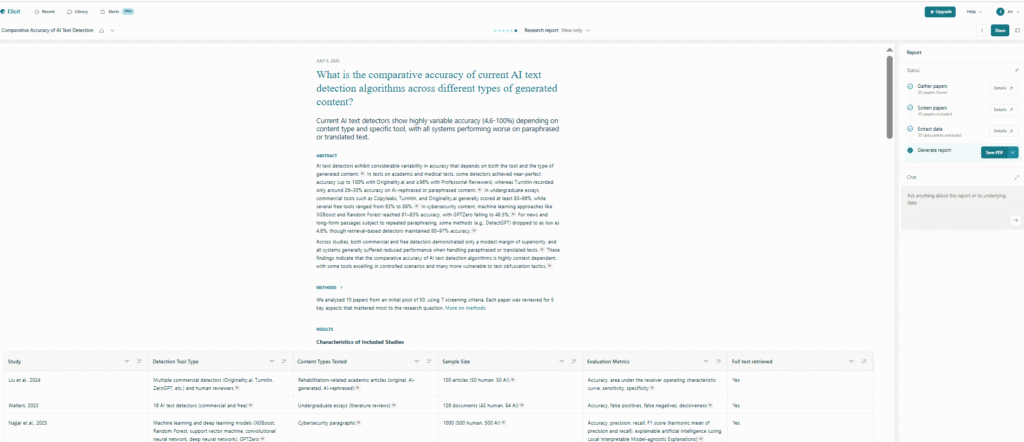
Elicit is an AI research assistant more focused on finding, screening, and synthesizing academic papers. You go to it when your main problem is: Which papers should I be reading, and what do they actually say?
Features
Elicit’s core features revolve around structured research workflows:
- AI-powered paper search across large academic databases
- automatic extraction of key information (methods, findings, limitations)
- screening views that explain why a paper was selected
- structured research reports with abstract, methods, synthesis, and references
- personal paper library for saving and reusing sources
- unlimited paper summaries, even on the free plan
Quality of the report (hands-on experience)
Using the exact same prompt as with SciSpace made Elicit’s strengths and limits very clear.
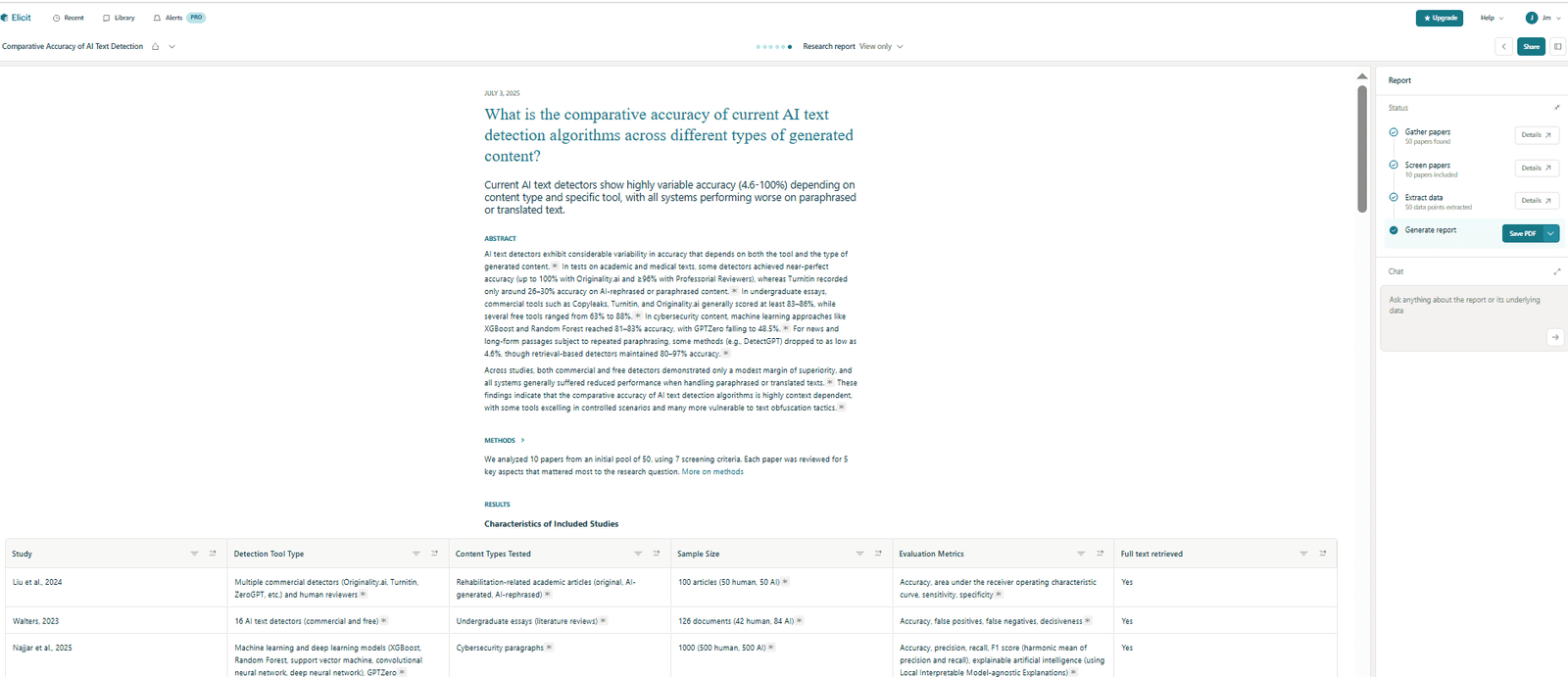
The report Elicit generated was very clean, well structured, and immediately usable. It felt more “ready to go” than SciSpace’s output. Sections like the abstract, methods, synthesis, and references were already formatted in a way that resembles an academic paper rather than a research dump.
However, Elicit found fewer sources than SciSpace in my test. That might be partly due to plan limitations, but the difference was noticeable.
That selectivity has benefits. The papers included were tightly aligned with the prompt, and the report stayed focused on quantitative comparisons—accuracy ranges, false positives, and performance metrics—rather than broad narrative discussion. For example, it explicitly surfaced accuracy figures for AI detection tools ranging roughly from the mid-50s to the high-90s, which is exactly what I was looking for.
One feature I appreciated a lot was the screening and justification layer. I could see why each paper was included, what definitions were used, and how conclusions were derived. This added transparency that SciSpace didn’t fully match.
Like every other tool I tested, Elicit also struggled to surface truly latest 2025 papers. Most references clustered around 2024. That’s a shared limitation across current AI research tools, not an Elicit-specific failure, but it’s still something you have to compensate for manually.
Pricing
Elicit has a very generous free plan, which makes it easy to test without commitment:
- unlimited paper summaries
- basic search and library features
The first paid tier starts around $12 per month, which is cheaper than SciSpace. However, it limits the number of full automated research reports you can generate (for example, around four per month).
3) ChatGPT & Gemini (Deep Research)
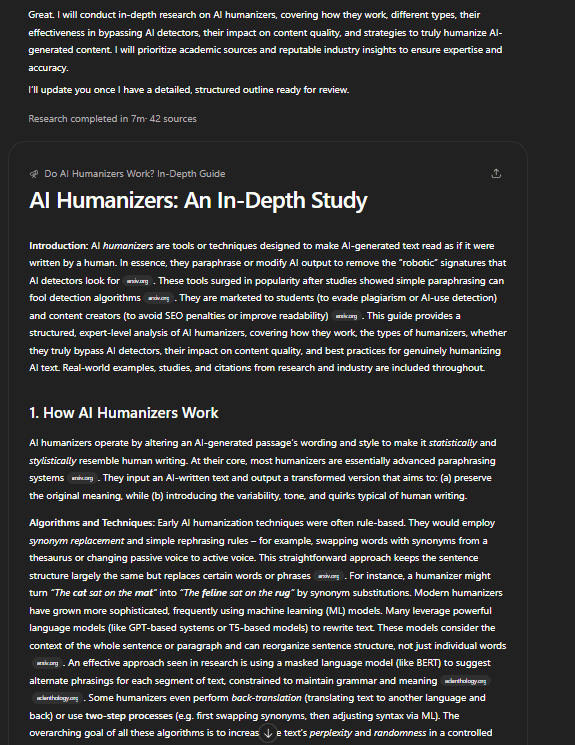
ChatGPT and Gemini are general-purpose AI chatbots, but once you upgrade to the paid plans, they unlock a feature really powerful for researchers: Deep Research.
Deep Research is designed to autonomously explore a topic, pull large numbers of sources, and synthesize them into a long-form research report.
Features
With Deep Research enabled, both tools can:
- search broadly across the web and academic-style sources
- aggregate dozens (sometimes hundreds) of references
- synthesize findings into a long, structured report
- surface recent tools, companies, and methods more effectively than most dedicated research platforms
- operate with minimal prompting once launched
Outside of Deep Research, you still get all the usual chatbot features: writing, editing, brainstorming, summarization, and general reasoning.
Quality of the report (hands-on experience)
ChatGPT’s Deep Research took several minutes to run and came back with around 70 sources. The report was fine, but honestly, it was one of the weaker outputs in this comparison. It found interesting references, but the coverage felt shallow relative to the time spent. The structure was there, but the synthesis didn’t go as deep as I expected, and I felt I would still need to redo large parts of the work.
In contrast, Gemini’s Deep Research was the strongest single report I generated across all tools.
Gemini surfaced a much larger and more relevant body of literature (more than 200 sources!). More importantly, it found very recent material that other tools missed, including up-to-date discussions of AI detection tools and newer systems like Pangram, which most other reports completely ignored.
The synthesis was also better. Gemini didn’t just list papers—it connected them, compared results, and highlighted disagreements and performance gaps. For a topic I already knew well, the report held up surprisingly well.
That said, there are tradeoffs. You can’t really edit the research process. Once the report is generated, you get the output, but you can’t tweak how it selected sources or re-run parts of the analysis. Exporting is also less convenient than with dedicated research tools.
Another limitation is access. Like all general AI chatbots, ChatGPT and Gemini cannot read licensed academic papers. They compensate with web sources and public reports, but you don’t get the same controlled corpus as with tools designed specifically for academic databases.
Pricing
This is where things get expensive.
To access Deep Research:
- you need a Plus or Pro plan (roughly €20–30/month)
- you get a limited number of Deep Research runs per month
- to remove most limits, you’re looking at plans closer to €200/month
That’s a serious investment. However, you’re not paying only for research. You’re paying for a full AI workspace: writing, editing, ideation, coding, and analysis.
4) Jenni AI
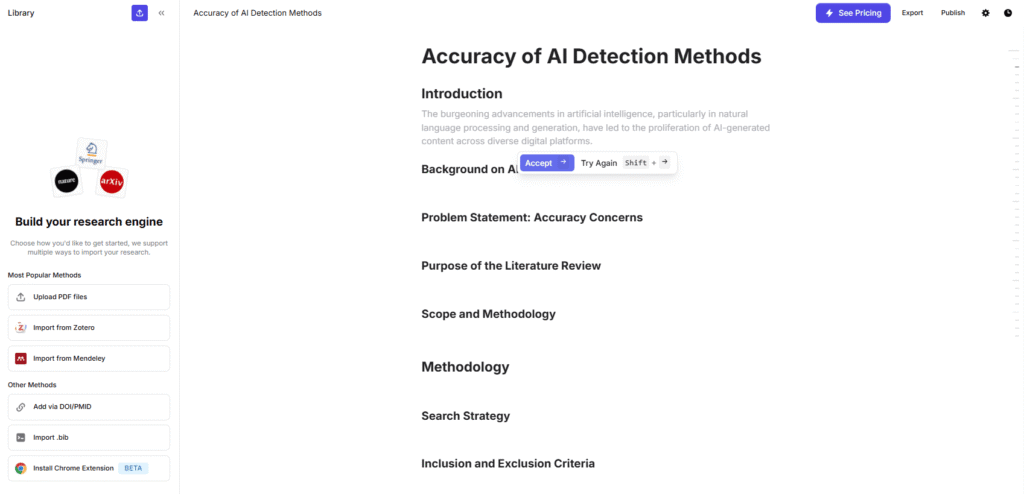
Jenni AI is more an AI academic writing assistant per se than an actual research finder.
Features
Jenni AI’s core capabilities include:
- AI-powered writing and autocomplete that suggests sentence and paragraph continuations based on your topic and sources.
- Citation and bibliography generation in popular formats like APA, MLA, and Chicago—saving you time and safeguarding academic integrity.
- Research assistance and idea prompts—it can help you brainstorm key points tied to your subject.
- Source management features including import from PDFs, web clippers, and personal libraries (depending on plan and workflow).
- AI chat for brainstorming, structure guidance, and drafting support, helping you refine arguments as you write.
Quality of the report (hands-on experience)
Unlike SciSpace or Gemini’s Deep Research, Jenni didn’t produce a full, ready-made literature review in one pass. Instead, what I got was writing support that felt interactive. As I typed my introduction and outlined sections, Jenni’s autocomplete suggestions would offer context-aware continuations that aligned with academic expectations—helpful when I wasn’t sure how to phrase a complex argument or connect two concepts.
In terms of source discovery, Jenni managed to pull relevant references, but not nearly as many as SciSpace or Gemini did. Part of this stems from the fact that it’s optimized more for writing support than automated bulk discovery. However, when I integrated a few key papers into its library, the AI was impressively good at suggesting how to integrate those citations into coherent text, reducing the mechanical work of formatting and placement.
The verbal quality was generally solid: sentences read like a knowledgeable peer editing alongside me, not a detached generator spitting pages of draft. That felt especially helpful when I was stuck trying to bridge two ideas or explain a complex methodological comparison.
Pricing
Jenni AI’s pricing is structured to support ongoing academic work, with flexibility between free and premium tiers:
- Free plan: Limited daily word generation (e.g., a 200-word cap in some documentation) and basic features to help you get started without cost.
- Premium / Unlimited plans: Around $29–$30 per month (with annual options lowering the effective rate), which removes word limits and unlocks the full suite of research, citation, and autocomplete features.
5) Scite AI
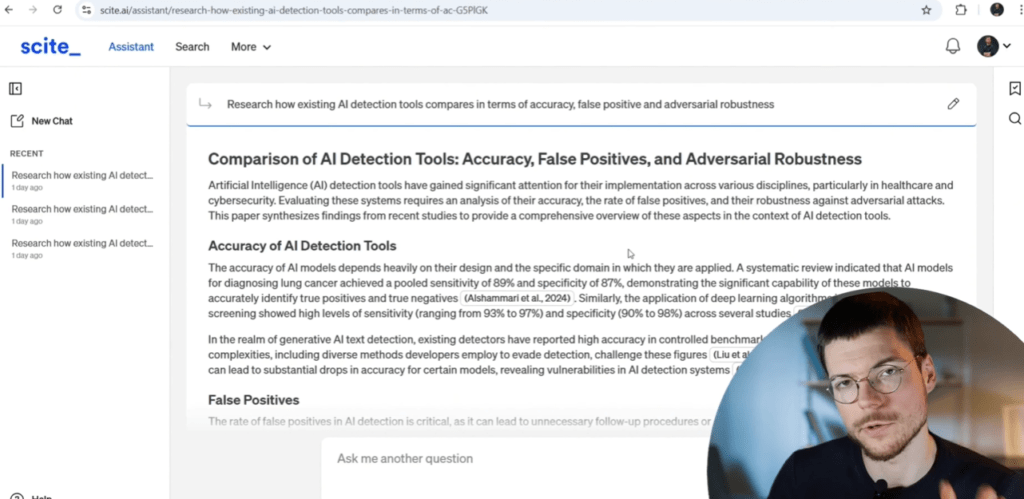
Scite AI sits on top of an already strong and well-know literature database and keyword-based search system made for researchers
Features
Scite’s feature set reflects that positioning:
- a large, curated database of academic papers with citation context
- “Smart Citations” that label references as supporting, contrasting, or mentioning
- keyword-based literature search (very strong compared to most AI-first tools)
- an AI research assistant that generates summaries based on Scite’s own database
- visibility into the keyword strategy used by the AI to find papers
- organizational features for teams and institutions
Quality of the report (hands-on experience)
When I asked Scite’s AI assistant to research and summarize the topic, the output was noticeably shorter and more limited than what I got from SciSpace, Elicit, or Gemini. The assistant surfaced only a handful of references—around six or seven—and provided a brief summary for each.
The summaries themselves were accurate, but shallow. There was no real synthesis across papers, no comparison of findings, and no attempt to explore multiple angles of the topic. Compared to other tools, it felt like an early-stage research note rather than a research report.
That said, there were two things Scite did better than most.
First, transparency. I could see exactly which keywords the AI used to find the papers and how the search was narrowed. That made it easier to trust why certain papers were included—even if there weren’t many of them.
Second, data quality. Because Scite relies on its own literature database, all sources were legitimate, licensed academic papers. There was no reliance on blog posts, secondary summaries, or loosely related web content. From a rigor standpoint, that’s a real advantage.
Still, if your goal is to quickly generate a comprehensive research report or literature review, Scite’s AI assistant is not there yet. It feels conservative, cautious, and underpowered compared to AI-first tools.
Pricing
Scite’s pricing is relatively affordable, especially given its academic positioning.
The individual plan sits around $16 per month, which gives you access to:
- the full citation database
- Smart Citations
- the AI assistant
- organizational and export features
There are also team and institutional plans designed for universities, labs, and publishers, with added collaboration and admin controls.
6) Consensus AI
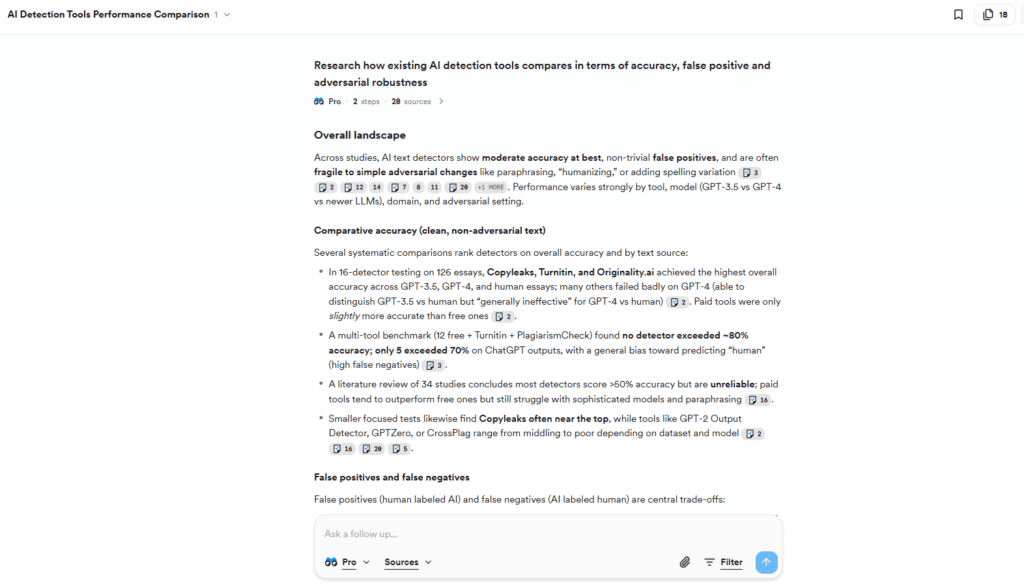
Consensus AI is an AI-powered academic search engine and research assistant designed to help you explore scientific literature quickly and with confidence.
Features
Consensus AI doesn’t just retrieve papers; it synthesizes and contextualizes them:
- AI-driven search across hundreds of millions of papers to find studies relevant to your query.
- Automatically generated summaries that bring key findings into focus.
- Citation linking so every claim in the output is backed by clickable academic sources.
- “Deep Search” functionality that expands beyond quick summaries to more comprehensive literature explorations.
- Tools to help you filter and refine results by relevance, methodology, and even study outcomes.
- Support for collaborative and saved research workflows through bookmarks and snapshots.
Quality of the report (hands-on experience)
In my testing, Consensus felt like a precision research companion more than a full report generator.
When I used the same prompt I had been using with other tools—asking it to explore and summarize a specific area of scientific evidence—Consensus delivered clean, academically credible summaries. It didn’t produce long narrative drafts like SciSpace or Gemini’s Deep Research did; instead, it offered high-level synthesis tied directly to the literature.
For example, instead of just telling me what various studies found, Consensus showed me how papers relate to one another, surfaced the most relevant findings first, and gave me reference links to click straight to the source. That saved me time compared to manually hunting down each paper after a keyword search.
This felt especially valuable when I needed to understand at a glance what the evidence said about a topic, rather than wading through hundreds of PDFs. The summaries were concise and structured around the scientific consensus on the question—not generic overviews that cherry-picked facts.
However, I also noticed that Consensus’s output tended to be shorter and less narrative than what I got from SciSpace or Gemini
Pricing
Consensus offers tiered plans tailored to how deeply you want to dive into research:
- Pro plan (~$15/month or $120/year): Includes unlimited pro analyses, study snapshots, and around 15 “Deep Searches” per month—ideal for occasional but serious research projects.
- Deep plan (~$65/month or $540/year): Expands the Deep Search quota to around 200 per month, along with all pro features, making it a good fit for frequent literature review work.
Get Rid of AI Slop
Get the free AI Humanizer and ready-to-use humanizing prompts.
Get the Free Toolkit
Buchert Jean-marc
Confirmed AI content process expert. Through his methods, he has helped his clients generate LLM-based content that fit their editorial standards and audiences expectations.
All Posts